


 Italiano
 Français
 Deutsch
 Español
 Português
Technical Guides & Tutorials
NEWS Instructions for using the Shopping Cart, Dual-Function Checkout, Immediate Order, or Custom Quote Printing.
🛒 Welcome to the UnigrafPrint operating guide! In this article, we show you step by step how to configure a product, manage options in your shopping cart, and complete your order or download and print an official, business-ready Custom Quote in PDF.
1️⃣ Product Configuration with Real-Time Calculation
- ⚙️ Advanced Customization: Select every single technical parameter (format, print run, paper weight and type for inner pages and cover, binding processes, packaging, and shipping).
- 📊 Cost Transparency: Our configurator instantly calculates the breakdown of every processing step and updates the Net Total, VAT, and Total VAT Included in real time.
- 🛒 Add to Cart: Once your preferences are set, simply click the red “ADD TO CART” button to save your configuration.

UnigrafPrint product configuration BackOffice view with all totals options expanded.
2️⃣ Review Options in the Advanced Cart
- 🔍 Detailed Summary: Review every single line item of your custom configuration.
- 🚚 Shipping & Pickup Calculation: Choose between courier delivery or select Warehouse Pickup or On-Site Pickup.
- 💳 Express Payment Methods: Direct and secure payment buttons are available via PayPal, Apple Pay, Google Pay, and Link.
- 🎫 Promotional Codes: If you have a discount voucher, enter it into the “Promotional code” field before proceeding.

UnigrafPrint Cart with added product BackOffice view with all totals options expanded.
3️⃣ Checkout Screen and Billing Details
- 🏢 Complete Company Data: Enter your Company Name, VAT number, Tax ID, SDI Code, and Certified Email (PEC) address for correct electronic invoicing.
- 📍 Different Shipping Address: By checking “Ship to a different address?”, you can specify an alternative delivery location and include a specific contact phone number for the courier.
- 🔒 Secure Connection: All entered data is protected by advanced SSL encryption.

UnigrafPrint Checkout with all options expanded to place an order using immediate payment.
4️⃣ Advanced Multilingual Checkout (EN, DE, FR, ES, PT)
- 🌍 Full Translation: By selecting the language switcher in the top menu (e.g., English, German, French, Spanish, Portuguese), the entire Checkout—including shipping options, billing fields, and payment options—is instantly translated.
- 💬 Multilingual Support: Ensures maximum clarity for direct purchases as well as quote requests for foreign branches and entities.

UnigrafPrint Checkout with all options expanded to place an order using immediate payment, displayed in English.
5️⃣ New Feature: “REQUEST CONFIGURATION QUOTE”
- 📄 Select the Option: In the payment methods section, select “REQUEST CONFIGURATION QUOTE”.
- 🖨️ Immediate Printing: The submit button will change to “PRINT THE QUOTE >”.
- 🛑 No Immediate Charge: This option allows you to receive a formal commercial proposal from us without making any payment at submission time.

UnigrafPrint Checkout REQUEST CONFIGURATION QUOTE version to print a quote.
6️⃣ Confirmation Page and Direct Quote Download
- ✅ On-Screen Summary: You will find the reference number (e.g.,
#10464), date, and specifications of all processing steps. - 🔴 “QUOTE/CONFIRMATION” Button: Clicking the red button at the bottom of the page allows you to view and directly download the quote PDF ready to archive or print.
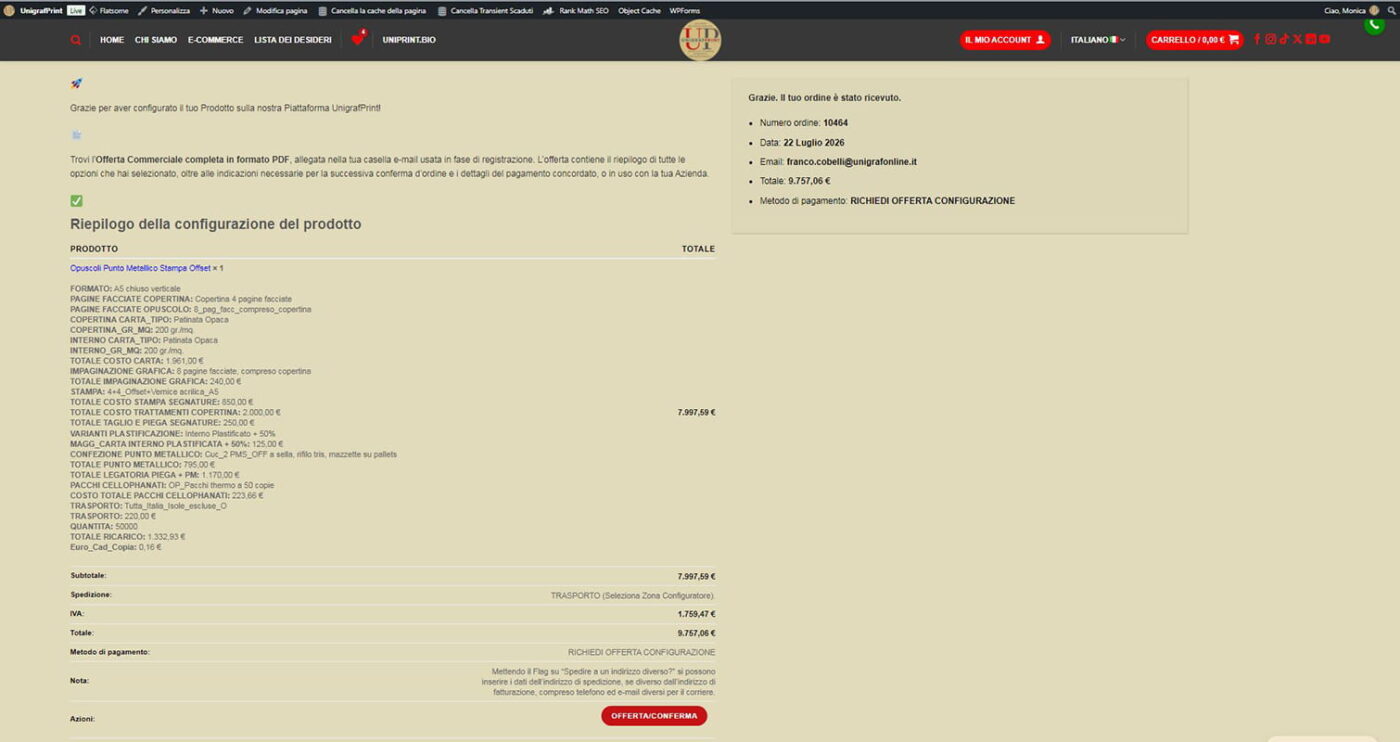
UnigrafPrint Checkout REQUEST CONFIGURATION QUOTE version completed.
7️⃣ Receiving the Official PDF Quote via Email
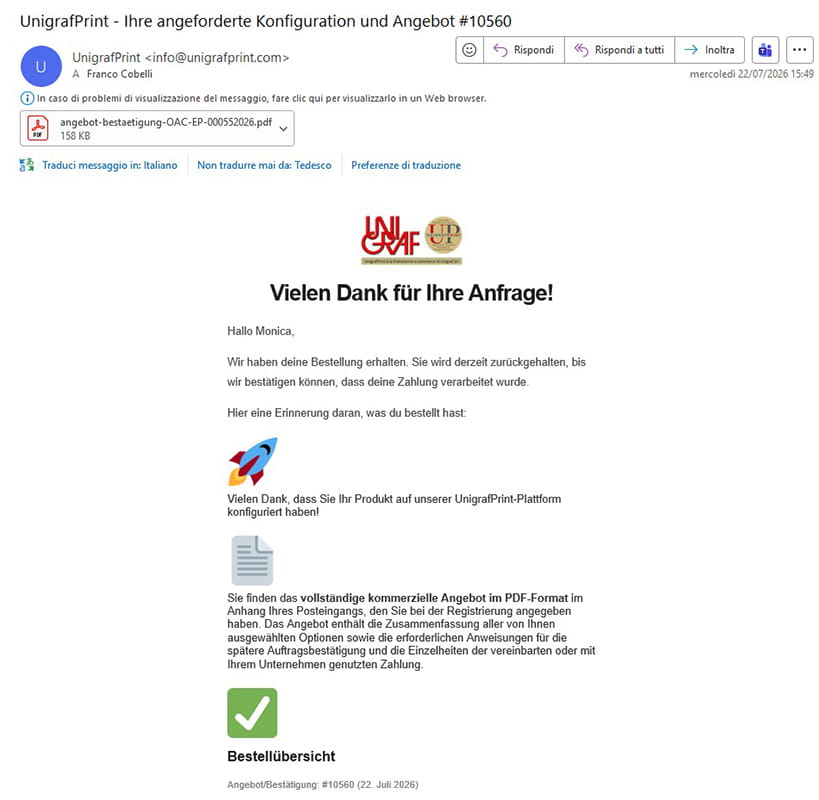
- ✉️ Immediate Notification: Simultaneously, you will receive an automated email with the subject “UnigrafPrint – Configuration quote request #…”.
- 📎 Attached PDF: Attached you will find the official PDF file of the commercial quote complete with technical details, selected options, and general terms.
UnigrafPrint message delivered to the email used during registration or entered at checkout for individual orders/quote requests.

8️⃣ How the Customized PDF Quote Looks
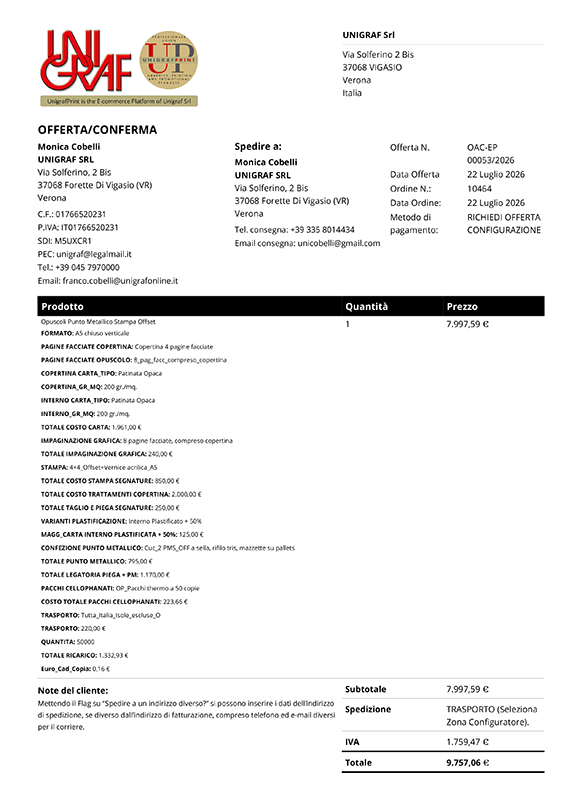
- 📋 Full Header: Contains company details for Unigraf Srl and the Client Company, including tax details, SDI, PEC, and contact person.
- 🔢 Unique Reference: Identified by a unique quote number (e.g.,
OAC-EP 00053/2026), date, and delivery details. - 📑 Itemized Breakdown: All processing steps (printing, paper, lamination, binding, shipping, and extra options) are clearly listed.
- ✍️ Valid for Acceptance: The footer includes bank details for transfer payments and space for Stamp and Signature for acceptance.



Want to try configuring your product right now?
Explore our dynamic configurators and create your first custom quote in just a few clicks!
👉 Go to the Guide to Dynamic Configurators | 🛒 Try the Stapled Booklets Configurator

